How to Organize Your Yoto Library with Groups
If your family loves Yoto, chances are your digital library is growing right along with your collection of physical cards! Between audiobooks, Make Your Own cards, podcasts, music and all those lovely listening options, it can get a little tricky to find exactly what you’re looking for.
That’s where Yoto Groups come in.
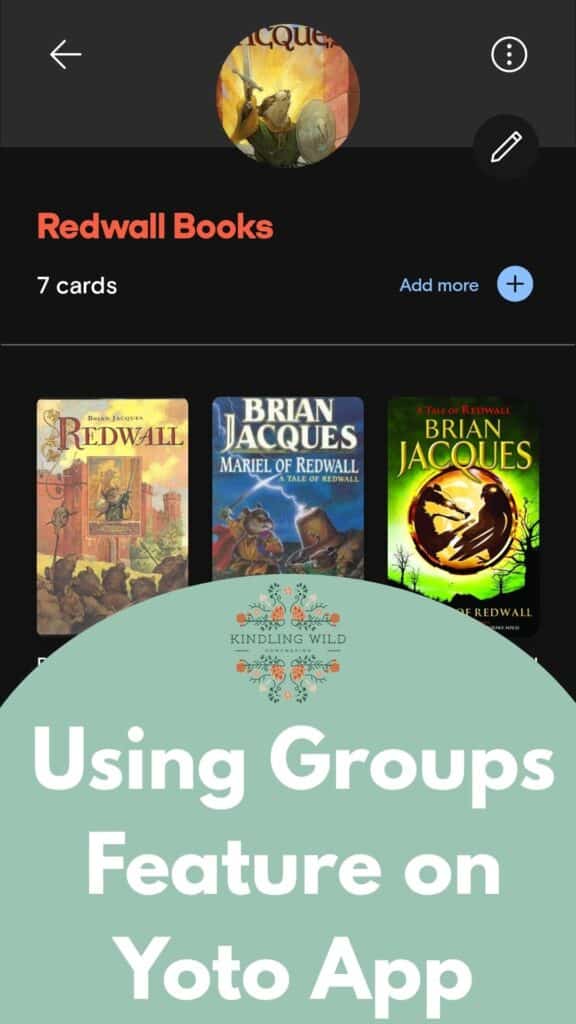
Groups are a simple but really useful feature in the Yoto app that lets you organize your digital cards into collections. Think of them as folders for your Yoto library. You can gather together favourite stories, bedtime listening, educational content or even create a digital morning basket for your homeschool.
And the best part? You don’t need to purchase anything extra to use them.
What Are Yoto Groups?
Yoto Groups are collections of digital cards in your Yoto app. They help you organize your library into categories that make sense for your family.
For example, you might have a Group for each child, a collection of bedtime stories, or a special collection of audiobooks for road trips.
Groups are particularly helpful once you’ve built up a collection of digital cards. Instead of scrolling through your entire library trying to find one particular story, you can open the relevant Group and find it much more quickly.
Are Yoto Groups the Same as Playlists?
No! Although they might sound similar, Groups and playlists do two different things.
A playlist plays audio tracks in sequence, one after another. A Group is simply a collection of cards. You can open the Group and choose whichever card you’d like to listen to.
Think of a Group as a folder rather than a playlist.
10 Ideas for Organizing Your Yoto Library
You can create as many Groups as you like, so you can organize your library in whatever way works best for your family.
Here are some ideas to get you started.
1. Create a Digital Morning Basket
This is one of my favourite ideas for homeschoolers!
Create a Group with all the listening resources you’d like to use during your morning basket. You could include poetry recordings, Scripture, saint stories, hymns, classical music, nature study podcasts and Make Your Own cards with memory work.
Everything is gathered in one place, ready for your morning routine. No searching through the library while everyone waits for you to find the right card!
2. Make a Group for Each Child
If you have several children sharing a Yoto library, individual Groups can make things much easier. Give each child a collection of their favourite stories, audiobooks and music.
3. Gather Your Bedtime Stories
Create a bedtime Group with gentle stories, sleep sounds, calming music, rosary, and favourite audiobooks. It’s a handy way to keep nighttime listening separate from the more energetic daytime collection.
4. Organize Your Make Your Own Cards
If you enjoy creating your own Yoto content, you might quickly accumulate quite a few Make Your Own cards. Create a Group for your MYO collection and organize your recordings, family stories, educational resources and playlists.
For more inspiration, see my guide to 25 Brilliant Ways to Use Yoto Make Your Own Cards for Homeschooling.
5. Make a Road Trip Collection
Keep your family’s favourite audiobooks, stories, music and podcasts together in a road trip Group. You’ll be glad you did when you’re trying to find something entertaining for the next long drive!
6. Create a Quiet Time Group
Gather together peaceful stories, audiobooks, music and other listening options for those afternoons when everyone needs a little downtime.
7. Keep a Collection of Short Stories
Have a collection of stories that are 15 minutes or less for those little pockets of time when you don’t want to start a longer audiobook.
8. Make a Group for New Cards
If you have recently added several cards to your library, put them in a Group so your children can explore their new listening options.
9. Collect Your Favourite Podcasts
If your family listens to podcasts through Yoto, you can gather them together in one convenient place. This is especially useful if you’ve added your own RSS podcasts.
You can read my step-by-step guide to adding an RSS podcast to your Yoto Player for more details.
10. Create a Family Favourites Group
Your kiddo is sure he wants to listen to Narnia, but he can’t decide which one! Group all your series (Redwall, Narnia, Little House, Boxcar Children) so it is easy to choose even when it is a little past bedtime.
Can the Same Yoto Card Be in More Than One Group?
Absolutely! You don’t have to choose just one category for a card.
For example, a saint story could be included in your homeschool morning basket, your Catholic listening collection and your child’s personal Group. The same card can appear in multiple Groups without needing to create another copy.
How to Create a Group in the Yoto App
Creating a Group is very straightforward.
- Open the Yoto app and go to your Library.
- Tap + Add a Group at the top of the screen.
- Give your Group a name.
- Choose an icon to help you recognize it. You can also upload photos here.
- Add the cards you’d like to include.
You can add cards from your library, including Make Your Own cards, podcasts, radio stations and sleep sounds.
You can always go back and use the edit tool to add more cards as your collection grows.
Do I Need to Buy Digital Cards to Use Groups?
No! You can use Groups with the digital versions of cards already in your library.
When you play a physical Yoto card in your Yoto Player or Yoto Mini, a digital version is added to the Library section of your Yoto app. From there, you can add it to your Groups.
This is particularly handy for families who already own a collection of physical cards but want to make better use of the digital library.
A Little Yoto Community Inspiration
One lovely detail about Groups is that the feature came about thanks to suggestions from the Yoto community on Yoto Space. It’s always nice to see a company listening to the families who use its products!
If your Yoto library is getting a little crowded, Groups are worth exploring. Whether you’re putting together a digital morning basket, organizing bedtime stories or simply making it easier for each child to find their favourites, it’s a small feature that can make everyday Yoto life a whole lot simpler.
Yoto Experts
We have been a Yoto family for about 2 years now and we consider ourselves experts in all the things you need to know! Check out some of my other posts on how Yoto can make your life easier.